

MCP CLI客户端
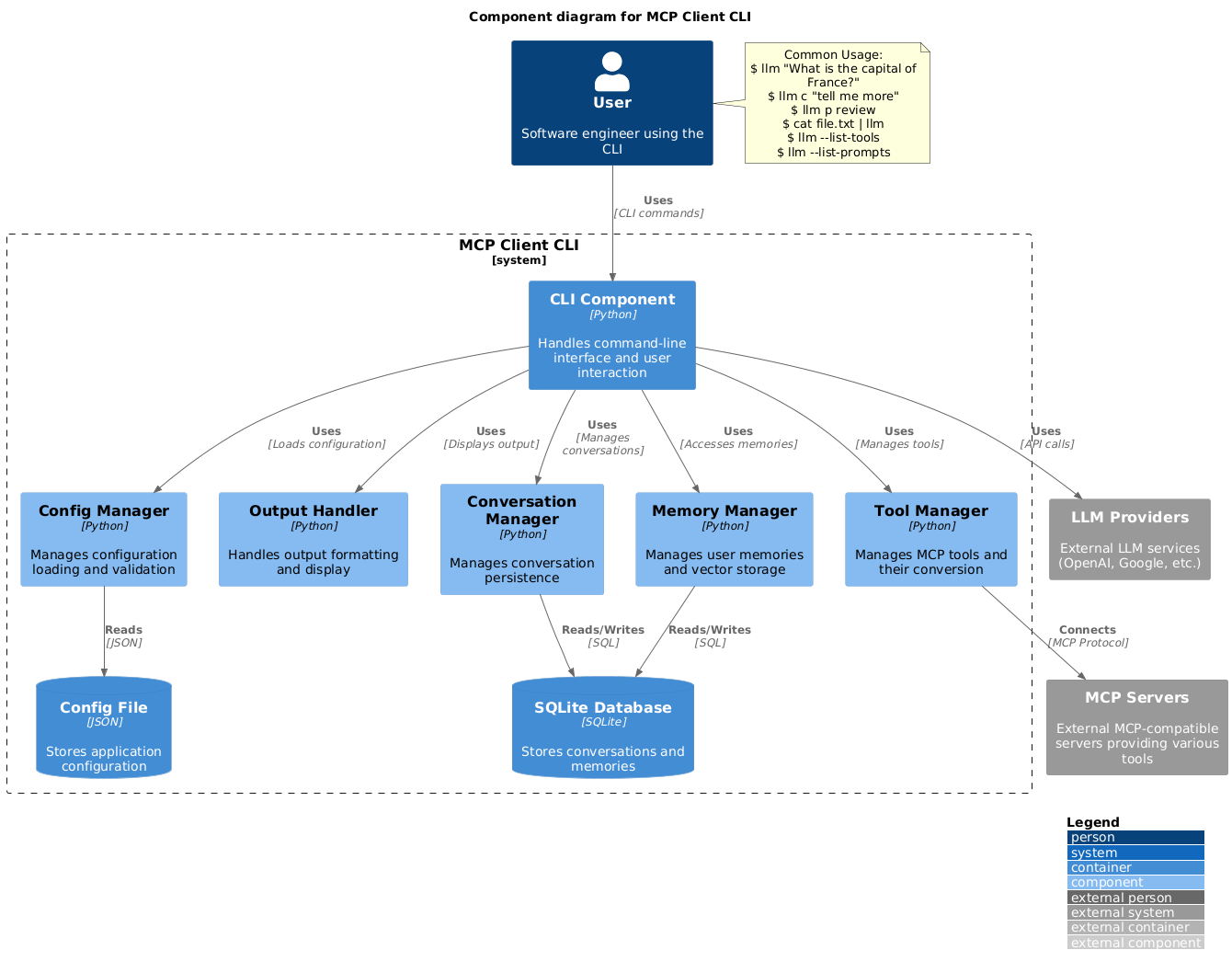
一个运行LLM提示符并实现的简单CLI程序 模型上下文协议(MCP) 客户。
您可以使用任何 MCP兼容服务器 从您终端的便利性。
它充当Claude Desktop旁边的替代客户端。此外,您可以通过以下方式使用任何LLM提供商,如OpenAI、Groq或本地LLM模型 大羊驼.
设置
- 通过pip安装:
pip install mcp-client-cli- 创建一个
~/.llm/config.json配置LLM和MCP服务器的文件:
   {
     "systemPrompt": "You are an AI assistant helping a software engineer...",
     "llm": {
       "provider": "openai",
       "model": "gpt-4",
       "api_key": "your-openai-api-key",
       "temperature": 0.7,
       "base_url": "https://api.openai.com/v1"  // Optional, for OpenRouter or other providers
     },
     "mcpServers": {
       "fetch": {
         "command": "uvx",
         "args": ["mcp-server-fetch"],
         "requires_confirmation": ["fetch"],
         "enabled": true,  // Optional, defaults to true
         "exclude_tools": []  // Optional, list of tool names to exclude
       },
       "brave-search": {
         "command": "npx",
         "args": ["-y", "@modelcontextprotocol/server-brave-search"],
         "env": {
           "BRAVE_API_KEY": "your-brave-api-key"
         },
         "requires_confirmation": ["brave_web_search"]
       },
       "youtube": {
         "command": "uvx",
         "args": ["--from", "git+https://github.com/adhikasp/mcp-youtube", "mcp-youtube"]
       }
     }
   }
注:
- 看 CONFIG.md 有关配置格式的完整文档 - 使用 requires_confirmation 指定哪些工具在执行前需要用户确认 - 还可以通过环境变量设置LLM API密钥 LLM_API_KEY 或 OPENAI_API_KEY - 配置文件可以放置在以下任一位置 ~/.llm/config.json 或 $PWD/.llm/config.json - 您可以在JSON配置文件中添加注释 // 如果你想切换配置
- 运行CLI:
llm "What is the capital city of North Sumatra?"用法
基本用法
$ llm What is the capital city of North Sumatra?
The capital city of North Sumatra is Medan.
您可以省略引号,但要小心bash特殊字符,如 &, |, ; 这可能会被你的shell解释。
您还可以通过管道从其他命令或文件输入:
$ echo "What is the capital city of North Sumatra?" | llm
The capital city of North Sumatra is Medan.

$ echo "Given a location, tell me its capital city." > instructions.txt
$ cat instruction.txt | llm "West Java"
The capital city of West Java is Bandung.
图像输入
您可以使用多模式LLM对图像文件进行管道分析:
$ cat image.jpg | llm "What do you see in this image?"
[LLM will analyze and describe the image]

$ cat screenshot.png | llm "Is there any error in this screenshot?"
[LLM will analyze the screenshot and point out any errors]
使用提示模板
您可以使用预定义的提示模板 p 前缀后跟模板名称及其参数:
# List available prompt templates
$ llm --list-prompts

# Use a template
$ llm p review  # Review git changes
$ llm p commit  # Generate commit message
$ llm p yt url=https://youtube.com/...  # Summarize YouTube video
触发工具
$ llm What is the top article on hackernews today?

================================== Ai Message ==================================
Tool Calls:
  brave_web_search (call_eXmFQizLUp8TKBgPtgFo71et)
 Call ID: call_eXmFQizLUp8TKBgPtgFo71et
  Args:
    query: site:news.ycombinator.com
    count: 1
Brave Search MCP Server running on stdio

# If the tool requires confirmation, you'll be prompted:
Confirm tool call? [y/n]: y

================================== Ai Message ==================================
Tool Calls:
  fetch (call_xH32S0QKqMfudgN1ZGV6vH1P)
 Call ID: call_xH32S0QKqMfudgN1ZGV6vH1P
  Args:
    url: https://news.ycombinator.com/
================================= Tool Message =================================
Name: fetch

[TextContent(type='text', text='Contents [REDACTED]]
================================== Ai Message ==================================

The top article on Hacker News today is:

### [Why pipes sometimes get "stuck": buffering](https://jvns.ca)
- **Points:** 31
- **Posted by:** tanelpoder
- **Posted:** 1 hour ago

You can view the full list of articles on [Hacker News](https://news.ycombinator.com/)
要绕过工具确认要求,请使用 --no-confirmations 标志:
$ llm --no-confirmations "What is the top article on hackernews today?"要在bash脚本中使用,请添加--no中间消息,这样它就不会打印中间消息,只打印结束消息。
$ llm --no-intermediates "What is the time in Tokyo right now?"延续
添加a c 在邮件前添加前缀以继续上次对话。
$ llm asldkfjasdfkl
It seems like your message might have been a typo or an error. Could you please clarify or provide more details about what you need help with?
$ llm c what did i say previously?
You previously typed "asldkfjasdfkl," which appears to be a random string of characters. If you meant to ask something specific or if you have a question, please let me know!
剪贴板支持
您可以使用剪贴板中的内容 cb 命令:
# After copying text to clipboard
$ llm cb
[LLM will process the clipboard text]

$ llm cb "What language is this code written in?"
[LLM will analyze the clipboard text with your question]

# After copying an image to clipboard
$ llm cb "What do you see in this image?"
[LLM will analyze the clipboard image]

# You can combine it with continuation
$ llm cb c "Tell me more about what you see"
[LLM will continue the conversation about the clipboard content]
剪贴板功能在以下情况下工作:
- 原生Windows/macOS/Linux环境
- Windows:使用PowerShell - macOS:使用 pbpaste 对于文本, pngpaste 用于图像(可选) - Linux:用途 xclip (需要剪贴板支持)
- Windows Linux子系统(WSL)
- 通过PowerShell访问Windows剪贴板 - 同时适用于文本和图像 - 确保您有权访问 powershell.exe WSL
剪贴板支持所需的工具:
- Windows:PowerShell(内置)
- macOS:
- pbpaste (内置)用于文本 - pngpaste (可选)用于图像: brew install pngpaste
- Linux:
- xclip: sudo apt install xclip 或同等物
CLI会自动检测剪贴板内容是文本还是图像,并对其进行适当处理。
附加选项
$ llm --list-tools                # List all available tools
$ llm --list-prompts              # List available prompt templates
$ llm --no-tools                  # Run without any tools
$ llm --force-refresh             # Force refresh tool capabilities cache
$ llm --text-only                 # Output raw text without markdown formatting
$ llm --show-memories             # Show user memories
$ llm --model gpt-4               # Override the model specified in config
贡献
请随时提交问题并提取改进或错误修复请求。